
Question:
When I import goods and customs charges import tax, how should I record the payment to customs for the import tax, and how should I record the foreign supplier’s Purchase Invoice?
Example scenario:
Purchase Invoice amount: SGD 100
Import Tax charged by customs (IM): SGD 9
Answer:
Create the Purchase Invoice for the supplier
When import tax is charged by customs, it should not be included in the foreign supplier’s Purchase Invoice because the tax is payable directly to customs. Therefore, in the Purchase Invoice, leave the tax code empty.
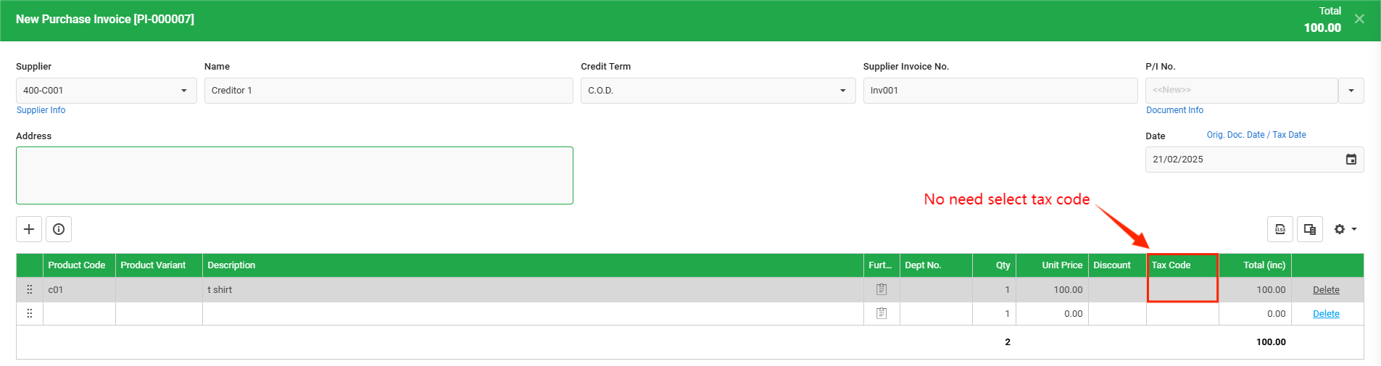
Record the import tax using a Journal Entry
Go to Accounting > Journal Entry,
Click on + New, enter the following:
For the debit side, enter the Purchase Account with the actual Purchase Invoice amount (SGD 100) and select the IM tax code.
For the credit side, enter the first line as the Purchase Account with the same amount (SGD 100) to offset the purchase amount. On the second line, enter the Bank Account used to make the payment and key in the actual import tax amount (SGD 9) only.
Note: Net Total of Debit and Credit must be same amount.
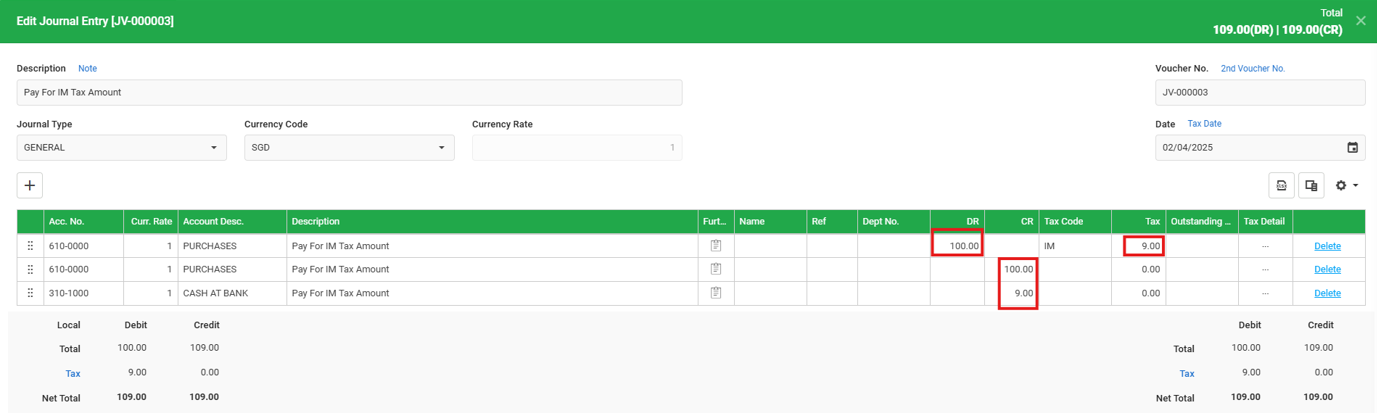
In the Transaction Details, only the import tax amount (SGD 9) and bank payment will be reflected, as the purchase amount is offset.

In the GST F5 form, the values will be reported correctly without duplication.
Box 5 – SGD 100 for taxable purchases
Box 7 – SGD 9 as 9% input tax

By: Yu Rou & Soon Horng 250224, Lay Swan 260213